As a freelancer, consultant, or professional with varying work scopes, accurately billing your clients for the time spent on projects is crucial. This is where hours worked invoices, also known as timesheet invoices or hourly invoices, come into play.
These specialized invoices provide a transparent breakdown of the work done, ensuring that clients understand how their money is being utilized and that service providers are compensated accurately.
Why Use Hourly Invoices?
Hourly invoices are essential for professionals whose work doesn’t fit neatly into fixed project-based pricing structures. By utilizing hourly invoices, you can accurately bill clients for the actual time spent on a project, offering transparency and accountability in the billing process.
This method ensures that both parties are clear on the scope of work and the compensation involved.
Benefits of Using Hourly Invoices
One of the key advantages of using hourly invoices is the flexibility they offer. Unlike fixed-rate projects, hourly billing allows for adjustments as the scope of work changes. This flexibility benefits both the service provider and the client, as it ensures that the billing accurately reflects the work completed.
Transparency and Accountability
Hourly invoices provide a detailed breakdown of the work completed, including the time spent on each task. This transparency allows clients to see exactly how their money is being allocated, fostering trust and accountability in the working relationship.
Accurate Compensation
By tracking hours worked and billing accordingly, service providers can ensure that they are compensated fairly for their time and effort. Hourly invoices help avoid underbilling or overbilling, leading to a more equitable exchange of services for payment.
Flexibility in Billing
Hourly billing is particularly useful for projects with uncertain timelines or fluctuating workloads. It allows for adjustments to be made as needed, ensuring that the client is billed accurately for the work completed.
Client Satisfaction
Providing clients with detailed hourly invoices can enhance their satisfaction and trust in your services. Clear and transparent billing practices demonstrate professionalism and integrity, helping to build long-term relationships with clients.
When to Choose Hourly Billing?
Hourly billing is ideal for projects with fluctuating workloads or uncertain timelines. If the scope of work is likely to change or if there are frequent revisions and client requests, using an hourly billing model can help you accurately track and bill for the time spent on each task. It provides flexibility for both you and your client, allowing for adjustments as needed.
Project Complexity
Projects that involve multiple tasks of varying complexity may benefit from hourly billing. By tracking time spent on each task, you can ensure that you are compensated fairly for the level of effort required.
Client Preferences
Sometimes clients may prefer hourly billing as it allows them to see a detailed breakdown of the work completed. This transparency can help build trust and confidence in your services.
Uncertain Timelines
If a project’s timeline is uncertain or subject to change, hourly billing provides the flexibility to adjust billing as the project progresses. This can help prevent disputes over project scope and pricing.
What to Include on an Invoice for Hours Worked?
When creating an invoice for hours worked, it’s important to include specific details to ensure clarity and accuracy. The essential elements to include on an hourly invoice are:
Date
Include the date or dates the work was completed to provide a clear timeline of the tasks performed.
Description
Provide a detailed description of the work completed during each time period. This helps the client understand the value of the services provided.
Hours Worked
Clearly state the number of hours worked for each task or project. This gives the client a breakdown of how their investment of time was utilized.
Rate
Specify the hourly rate agreed upon with the client to avoid any confusion over billing amounts.
Total Amount Due
Calculate the total amount owed based on the hours worked and the agreed-upon rate. This provides a clear sum for the client to pay.
How to Create an Invoice for Hours Worked
Creating an invoice for hours worked doesn’t have to be complicated. Follow these simple steps to create a professional and accurate invoice:
Use a Template
Start with an hours worked invoice template to ensure that all necessary information is included. Templates can streamline the invoicing process and help you maintain consistency in your billing practices.
Fill in Client Details
Include the client’s name, address, and contact information on the invoice. This ensures that the invoice is directed to the correct recipient and provides essential details for payment processing.
Add Work Details
Provide a detailed breakdown of the work completed, including the date, hours worked, and description of tasks. This information helps the client understand the scope of work and the value provided.
Calculate Total Amount Due
Multiply the hours worked by the hourly rate to calculate the total amount owed. Double-check your calculations to ensure accuracy in the final billing amount.
Include Payment Terms
Specify the payment terms, such as due date and preferred payment method, on the invoice. Clear payment terms help avoid confusion and ensure timely payment from the client.
Is It Necessary to Include a Timesheet With an Hours Worked Invoice?
While it’s not always necessary to include a timesheet with an hours worked invoice, providing a detailed breakdown of the work completed can add an extra layer of transparency and professionalism. Including a timesheet can help clients visualize the time spent on each task and understand the value they are receiving for their investment.
Tips for Improving Hourly Invoicing Efficiency
To streamline your hourly invoicing process and ensure accuracy, consider implementing the following tips:
Use Invoicing Software
Utilize invoicing software to automate the invoicing process and track billable hours efficiently. Invoicing software can help you generate professional invoices quickly and accurately.
Communicate Clearly
Establish clear communication with clients regarding billing procedures and expectations. Clear communication can help prevent misunderstandings and ensure that clients are aware of your billing practices.
Track Time Accurately
Use time-tracking tools to monitor and record the time spent on each task or project. Accurate time tracking ensures that you bill clients correctly for the work completed.
Review Invoices Thoroughly
Double-check invoices for accuracy before sending them to clients to avoid errors or discrepancies. Thoroughly reviewing your invoices can help maintain professionalism and prevent billing disputes.
Follow Up on Payments
Send reminders for overdue payments and follow up with clients to ensure timely payment. Following up on payments can help you maintain a healthy cash flow and avoid payment delays.
Hours Worked Invoice Template
If you’re looking for a simple and professional hours worked invoice template, consider using the following format:
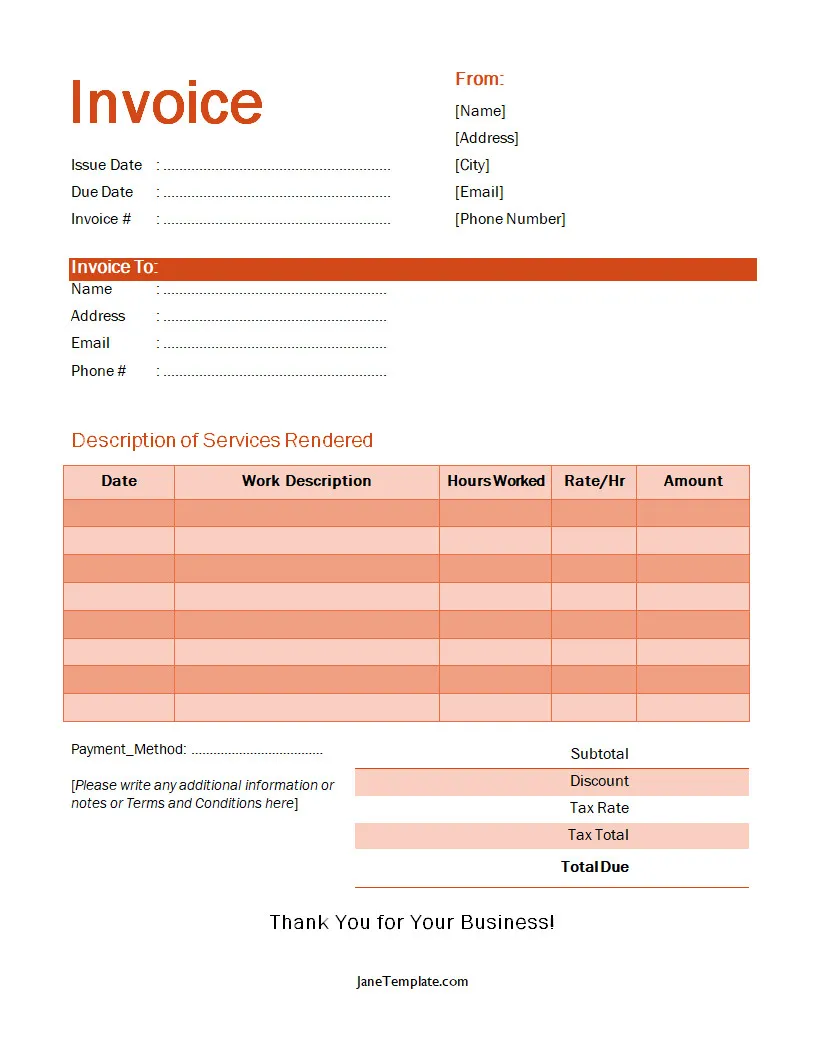
Hours Worked Invoice Template – DOWNLOAD
